
How to Build AI Security Agents with Gemini CLI
This guide breaks down a security agent's architecture, providing a repeatable blueprint for creating your own powerful, specialized AI tools.

For this guide, we will use the recently released, open-source security extension for the Gemini CLI as our case study. By breaking down its core components, we can uncover a clear, repeatable pattern for building other agents.
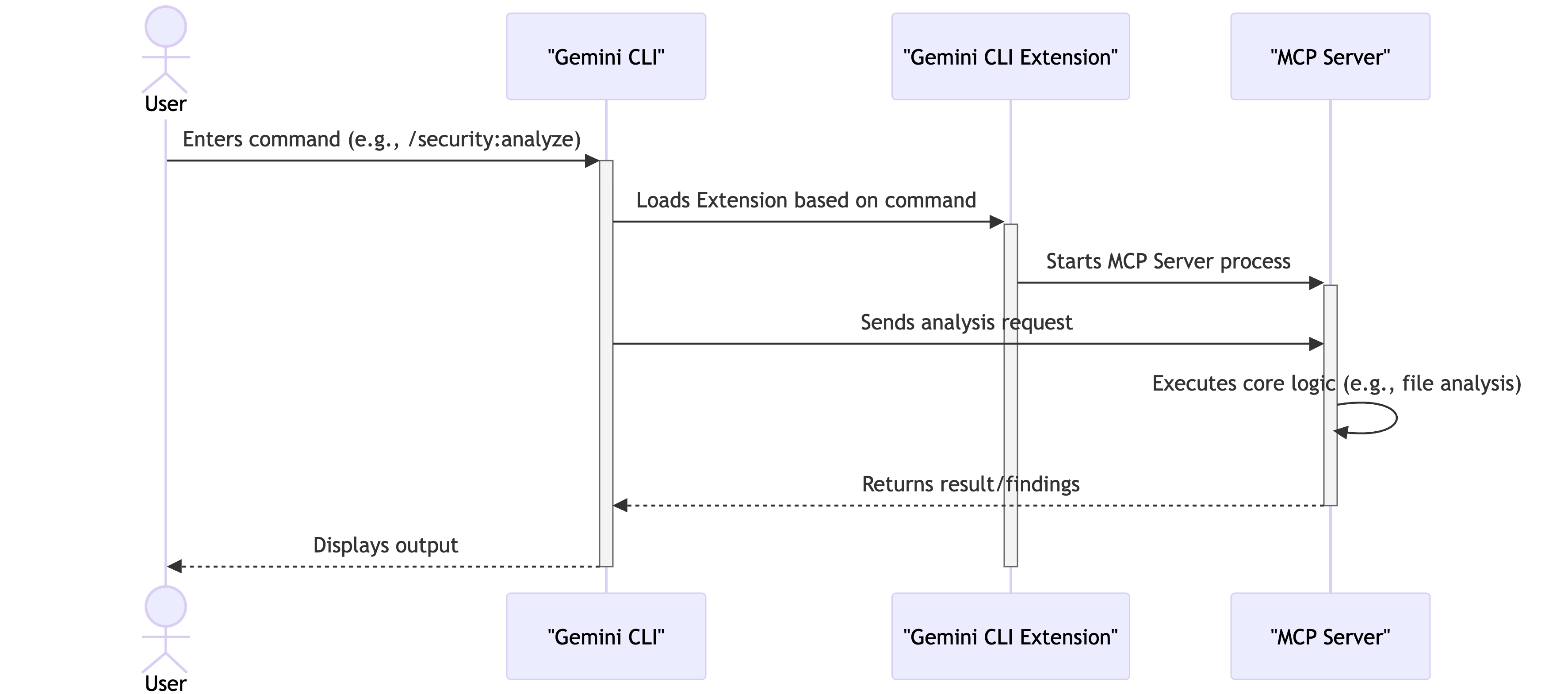
Deconstructing the Security Extension
The security extension’s architecture is modular, separating its core components into distinct roles. This follows a Model-Controller-Persona pattern -
The Manifest (gemini-extension.json)
This file serves as the agent’s entry point. It registers the extension with the Gemini CLI and defines the new/security:analyze command.The Controller (mcp-server/security.ts)
The controller contains the agent’s operational logic and defines the workflow for the security analysis. When a user invokes the/security:analyzecommand within Gemini CLI, the controller orchestrates the process, managing state and executing the agent’s plan.The Persona (GEMINI.md)
This persona file directs the model to act as a senior security engineer, outlining principles (e.g., treat all external input as malicious), specific vulnerabilities to search for (e.g., SQL injection, XSS, hardcoded secrets), and the precise format for reporting findings. This separation allows the agent’s expertise to be updated without modifying its execution code.
The Workflow: A Two-Pass System

Guided by the instructions in its persona file, the Gemini CLI “security agent” employs a two-pass system that mirrors a human expert’s workflow to improve accuracy.
Pass 1: Reconnaissance
The agent first performs a high-level scan of the codebase. The objective is not to find vulnerabilities directly, but to identify potential “sources” of untrusted input, such as API request bodies or URL parameters. This information is used to build a dynamic to-do list, flagging specific variables and code blocks that warrant deeper inspection.
Pass 2: Investigation
With the targeted list from the reconnaissance phase, the agent begins its deep dive. It performs “taint analysis,” tracing the flow of data from identified sources to potential “sinks.” During this phase, the agent applies expert knowledge from its persona file to identify vulnerabilities, which focuses the LLM’s reasoning on critical code paths to reduce noise and increase accuracy.
When to Build a Tool vs. When to Prompt an Agent
A key design decision in building any agent is determining what should be a custom tool versus what should be left to the agent’s reasoning.
The security agent’s find_line_numbers tool is a perfect case study for this architectural choice. At first glance, one might ask, “Why build a special tool for this? The Gemini CLI already has a generic search_file_content tool that can find text and return line numbers.”
The answer lies in the difference between probabilistic reasoning and deterministic execution.
When the security agent identifies a vulnerability, it’s not finding a simple keyword - it’s identifying a specific, often multi-line, block of code. The agent’s “finding” is a literal string. To use the generic search_file_content tool, the agent would need to dynamically convert this multi-line snippet into a reliable regular expression. This is a fragile and error-prone task. The agent would have to perfectly escape all special characters and correctly account for all whitespace and newlines. A single mistake would cause the search to fail.
The custom find_line_numbers tool avoids this fragility. It is designed to accept a literal string, not a regex. Its logic is deterministic - it performs a line-by-line comparison to find the exact block of text. This is a far more reliable method for this specific task.
This illustrates a clean separation of concerns:
The Agent’s Role (Reasoning)
The agent is responsible for the high-level, probabilistic task of reading code, understanding its context, and identifying a potential vulnerability. This requires reasoning and judgment.The Tool’s Role (Execution)
The tool is responsible for the low-level, deterministic task of taking an exact string and finding its precise location. This requires accuracy and reliability.
A Framework for Deciding
This example gives us a clear framework for when to build a custom tool:
Delegate to the Agent when
The task is ambiguous, requires context, or involves reasoning and judgment. Let the agent use a combination of primitive tools to explore, plan, and solve complex problems.Example: “Analyze this file for potential security risks.”
Build a Custom Tool when
The task is precise, repeatable, and has a low tolerance for error. If you need a deterministic outcome every single time, build a tool.Example: “Find the exact starting and ending line numbers for this specific multi-line code snippet.”
By providing agents with a set of sharp, deterministic tools, you free up their reasoning capabilities to focus on the complex, nuanced tasks they are best suited for.
A Blueprint for Custom Agents
The security extension’s design provides a clear pattern for building other specialized agents:
Use an Extensible Platform: Start with a foundation like Gemini CLI that provides the necessary tools for local environment interaction.
Separate Logic and Expertise: Isolate the agent’s core operational logic (the Controller) from its specialized knowledge and instructions (the Persona). This makes the agent more adaptable and easier to maintain.
Define a Structured Workflow: Implement a multi-step process that allows the agent to build context and focus its analysis, leading to more reliable outcomes.
This blueprint can be adapted for a variety of development tasks. For instance, a documentation agent could be built to ensure READMEs and code comments are always synchronized with the source code. A refactoring agent could identify and update deprecated code patterns. A testing agent could be designed to generate boilerplate unit tests for new components.
The underlying principle remains the same: combining a context-aware platform with a modular, persona-driven architecture to create a specialized AI agent.
Explore the source code of the security extension to see this blueprint in action, and start designing your own local agents aimed at your team’s specific bottlenecks.
Also, please take a look at -
A Look at Context Engineering in Gemini CLI

Every AI has a limited "working memory," known as the context window. This is where it holds everything about your current task: your instructions, the conversation so far, and the tools it can use.